
Mac mini M4 and Mac Studio: Can the Storage Actually Be Upgraded? The Real Answer
The drive in the Mac mini M4 and Mac Studio is removable — it’s not soldered down. But you can’t just drop in an off-the-shelf drive either. Here’s what’s actually true, and how to upgrade it the right way.
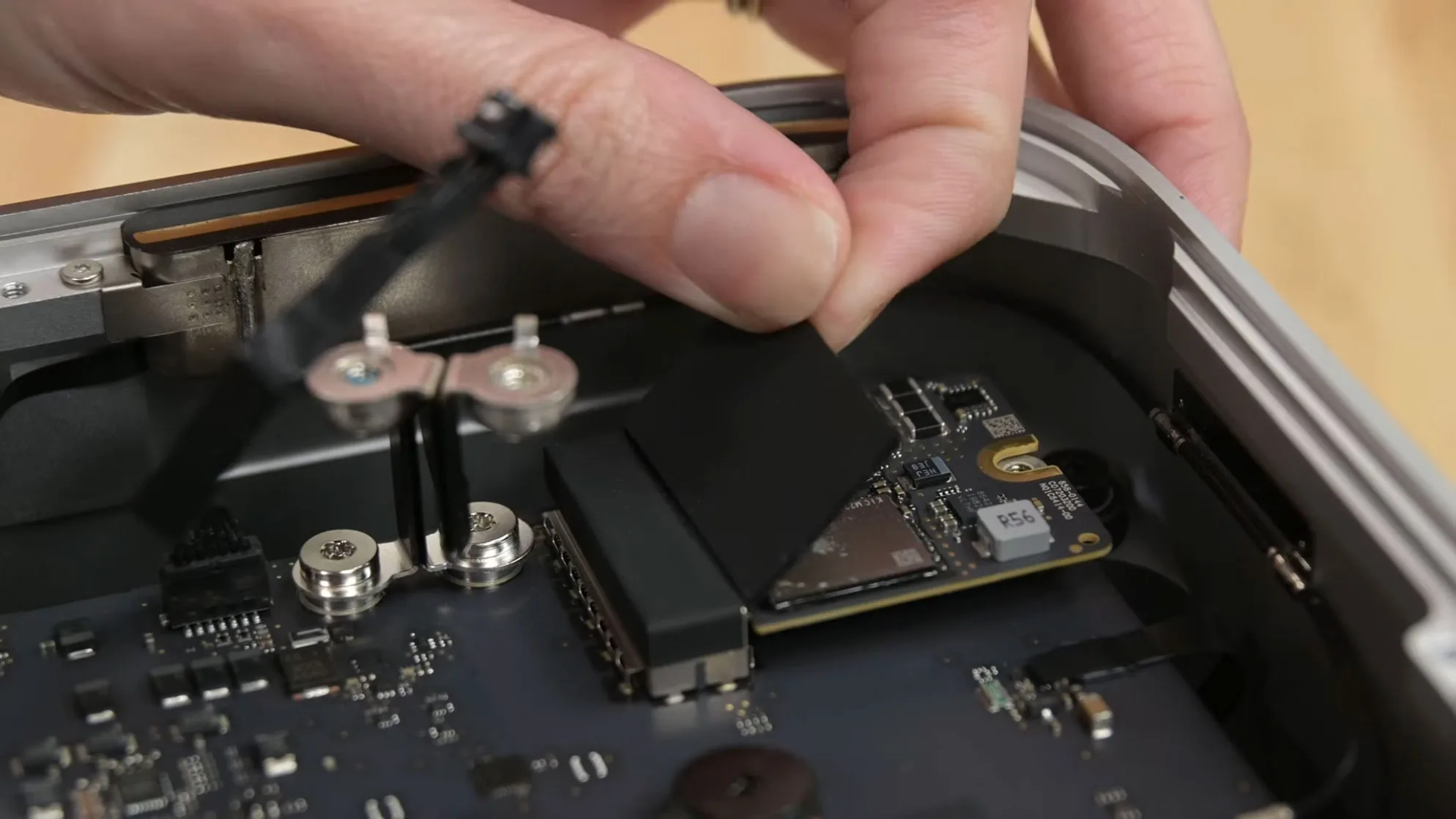
The drive in the Mac mini M4 and Mac Studio is removable — it's not soldered to the board the way it is in a MacBook. That doesn't mean you can drop in any drive from the nearest electronics store, though. Here's what's actually true.
The drive comes out, but it's not a "normal" SSD
On every Mac Studio (from the original M1 Max/Ultra through the M4 Max/M3 Ultra) and on the redesigned 2024 Mac mini M4, storage lives on a separate module you unscrew and pull out — not soldered in place like the RAM chips or the processor itself.
The catch is elsewhere: the storage controller doesn't live on the module the way it does on a normal SSD — it's built into the M-series chip itself. That means a standard off-the-shelf M.2 SSD simply won't be recognized. You need a compatible module — either a genuine Apple one pulled from a higher-capacity unit, or a compatible third-party module built specifically for this purpose.
One more thing to watch for: on the Mac mini, the M4 and M4 Pro use differently sized storage modules — they're not interchangeable with each other.
So can it actually be upgraded
Yes — compatible storage modules now exist, up to 16TB, from specialized manufacturers, and they install without any soldering, as a straightforward module swap. It's not something you casually do the first evening you own the machine, though: opening the machine, handling the internal components correctly, and confirming the module is properly recognized takes care and experience — and Apple doesn't officially cover this under warranty.
At flip2store, this is exactly what we handle: storage swaps/upgrades on the Mac mini M4 and Mac Studio, using the right compatible modules. Because it depends on the exact model and the capacity you want, pricing is given after a short diagnosis.
Why it's worth thinking about
A Mac mini M4 or Mac Studio at the base storage tier (256GB or 512GB) costs noticeably less than the same machine configured with 2TB or 4TB directly from Apple — Apple's price jump for extra storage is disproportionately large. Buying the smaller-capacity machine and upgrading the drive afterward usually works out considerably cheaper, whether the machine is new or used.
If you already own a Mac mini M4 or Mac Studio and you're running low on space, or you're thinking about buying one and want to know what makes more sense — small capacity with a future upgrade, or going big from day one — book an appointment with us. We'll tell you exactly what's involved, what it costs, and what the smartest move is for your situation.
Interior photo of a Mac mini M4: iFixit.com — see the full teardown at https://www.ifixit.com/News/104302/all-hail-the-return-of-upgradeable-storage-mac-mini-2024-teardown